B2B Suite
Business buyers order as a company: several people, their own prices, someone who approves, an invoice to pay later. The B2B Suite lets them do all of that in your Magento store themselves, while the prices, limits and approvals you set decide what each of them can buy.
Latest version: 1.0.0 — changelog
Who it's for
- Manufacturers and distributors with negotiated prices. Price lists, contract prices per company and product, and a price explanation that shows which step set a company's price.
- Stores whose customers buy through a purchasing process. Purchase orders, approval rules with stages and quorums, budgets, spend limits at checkout and order review before an order goes through.
- Sellers who quote. Buyers turn a cart into a quote; your sales team answers it from a quote desk with margins, price exceptions and response times, and agreed prices become agreements buyers order from.
- Merchants invoicing businesses in the EU. VAT ID checks, reverse charge, tax exemption certificates and e-invoices in Peppol BIS, Factur-X/ZUGFeRD and KSeF FA(3) formats.
Why it matters
- Fewer orders typed in by your team. Buyers register their company, invite colleagues, reorder from order guides, requisition lists and Quick Order, and pay invoices online, so the orders and payments your team used to key in arrive complete.
- Every buyer sees their own price. Company price lists and contract prices apply in the catalog, the cart, quotes, REST, GraphQL and to AI agents alike, and you can see why a price is what it is.
- The customer's own rules are kept for you. Roles, budgets, approval chains and spend limits are enforced at checkout, so an order that breaks them never reaches you as a dispute.
- Credit risk you can see. Payment terms, credit limits, credit holds, receivables and dunning live next to the orders, and a held account cannot order on account.
- A record of who did what. Company changes, approvals, price decisions and agent actions are written to an audit log with the person or system that made them.
See it in action
-
Quantity rules on Quick Order. You set a minimum of 4 and a multiple of 2 for
24-MB04for a company. A buyer who pastes24-MB04 3is toldThe minimum order quantity for 24-MB04 is 4., and24-MB04 5is answered with24-MB04 is sold in multiples of 2.Only lines that keep the rule go to the cart.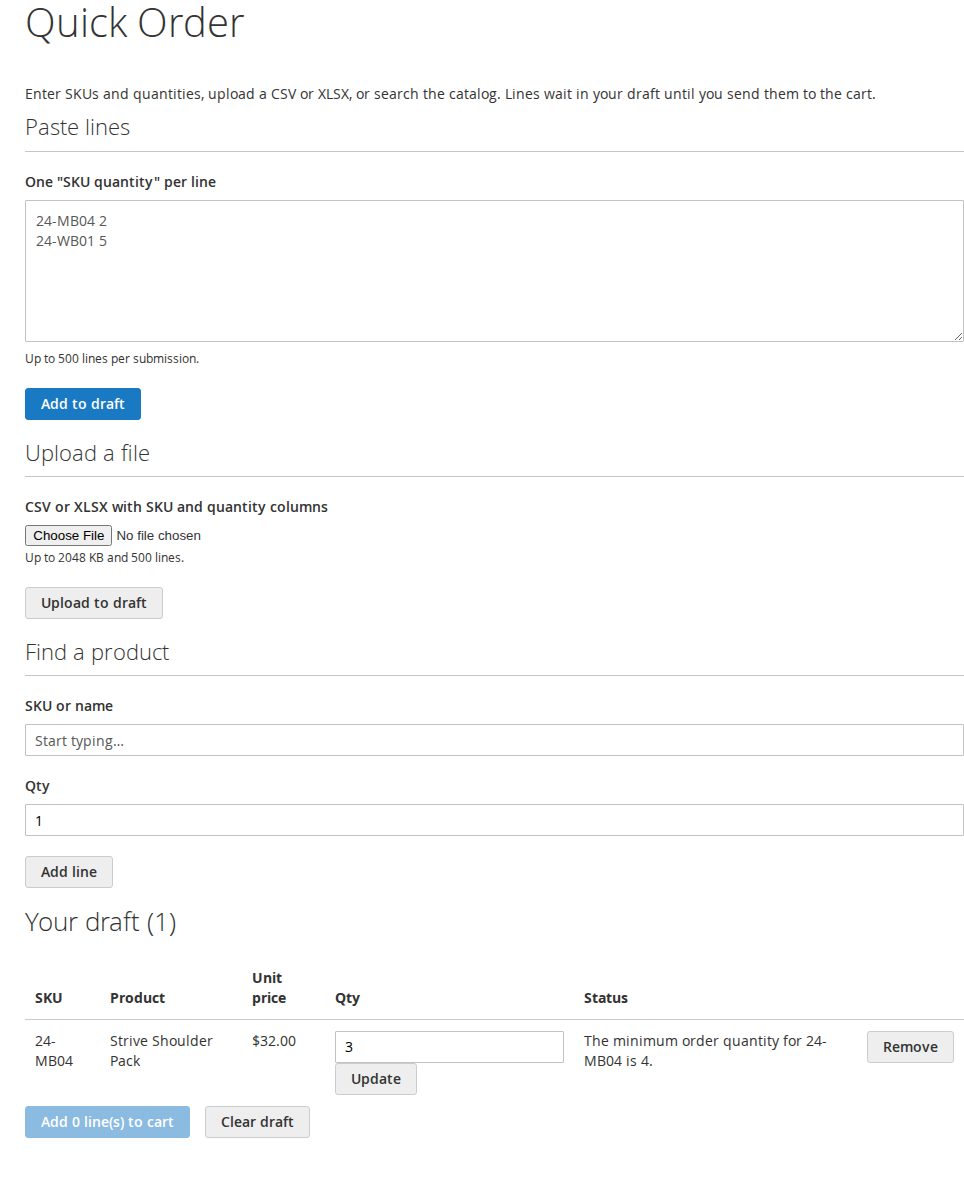
-
A price check at the company price. A buyer pastes
24-MB04 2into the price check and sees$28.80per unit and$57.60for the line: their company's price, not the catalog price. -
Why a price is what it is. For a company with a contract price of
11.11on24-MB04and no price list, the admin Price Explanation for three units answers11.11, from the contract, and says why every other pricing step did not apply.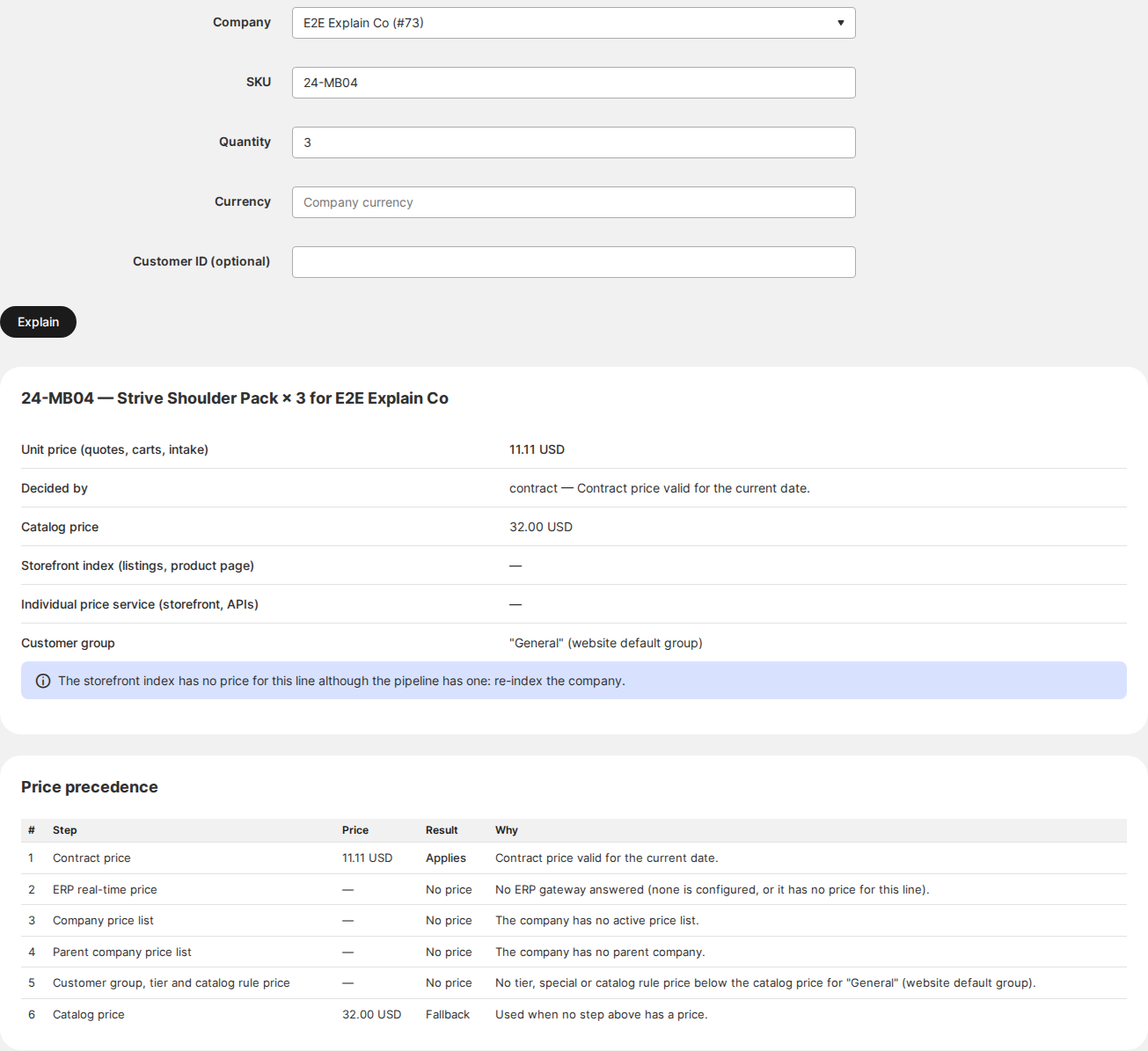
-
An AI agent priced at the buyer's company price. An agent connected over MCP with a buyer's key asks
get_price_availabilityfor24-MB04 × 2and getsunit price 28.80, row total 57.60, the buyer's company price. It sees only the tools that key allows. -
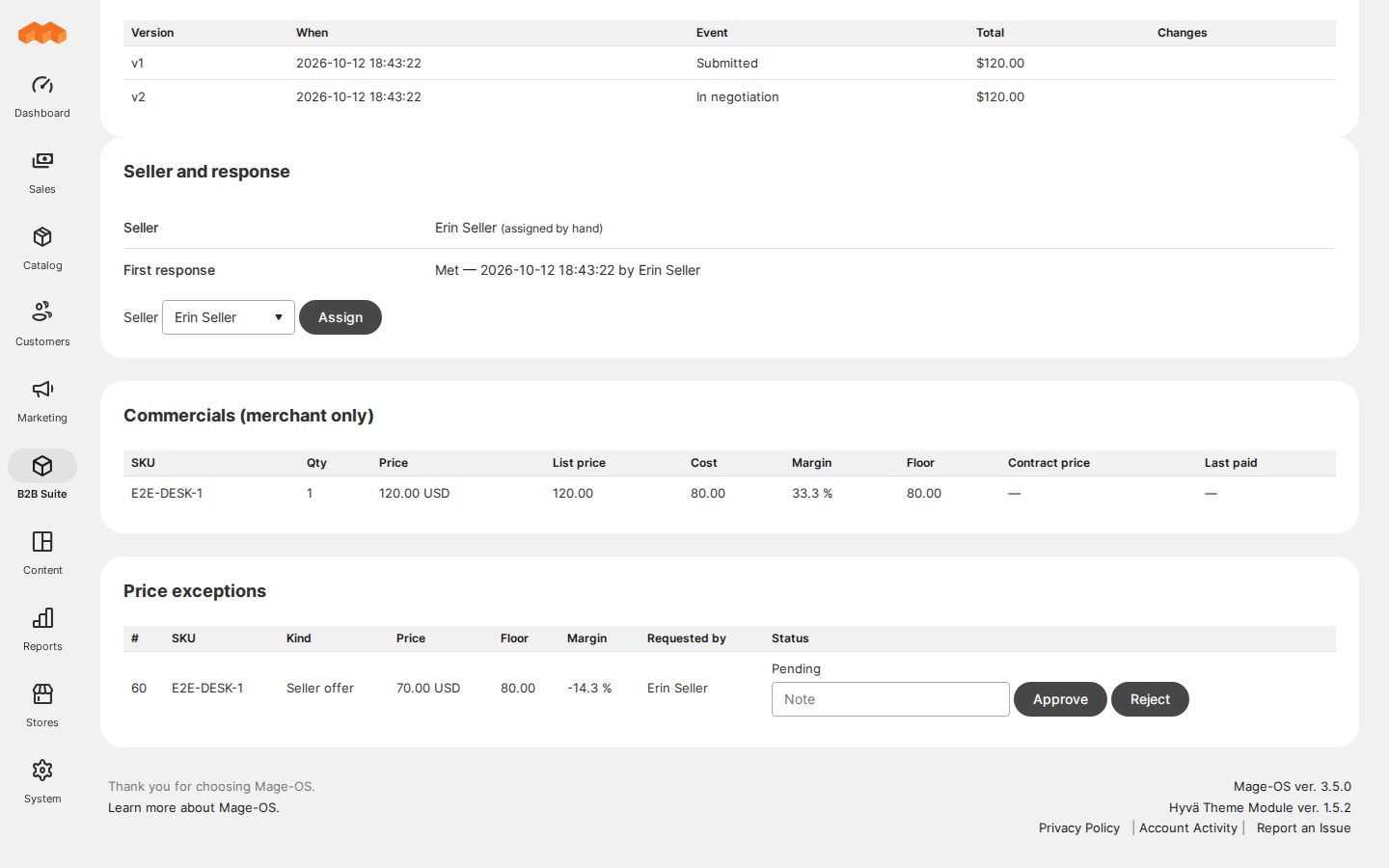
An offer below cost held for approval. With the shipped Minimum Margin (%) of
0, a seller who offers a price below a line's cost on a quote does not reach the buyer: the quote page shows the offer held as a price exception, and the buyer sees it only once another admin approves it from the Price Exceptions queue.
Features
| Feature | Benefit |
|---|---|
| Company accounts | Each customer is a company with its members, administrators, addresses and its own order list |
| Websites, currencies and company switching | A company buys on the websites and in the currency you give it, and a member of several companies switches between them |
| Registration, invitations and sign-up | New companies apply online and start with the roles and settings you chose; administrators invite their colleagues |
| Roles, teams and permissions | Buyers manage their own colleagues and decide who may order, approve and pay |
| Single sign-on | Your customers' staff sign in with their company's identity provider, over OpenID Connect or SAML |
| Price lists and contract prices | Each company buys at its negotiated price everywhere it orders, and you can see why it pays what it pays |
| Catalog access and visibility | Each company and role sees only the products and categories meant for it, and guests can be asked to sign in first |
| Part numbers, documents and search | Buyers find products by their own part numbers and download the certificates and data sheets they need |
| Quotes and negotiation | Quote, negotiate and turn agreed prices into orders without spreadsheets |
| Quote desk | Sellers see cost and margin on every line, offers below the floor wait for approval, and you track response times and win rates |
| Quick order, requisition lists and saved carts | Repeat orders take seconds instead of a phone call |
| Order guides and standing orders | Buyers reorder from their own buying history and schedule recurring orders |
| Approvals and purchase orders | Orders follow the customer's own approval process before they reach you |
| Budgets, spend limits and spend reports | Spending stays within the budgets each company sets, and its administrators see where the money goes |
| Checkout references, ship-to and branch pickup | Orders arrive with the PO number, cost center and address the buyer's accounts team needs |
| Order amendments | Buyers request changes to placed orders online; you decide, and an approved change replaces the order |
| Company returns | Buyers request returns online and you resolve them with a refund or a credit to their account |
| E-mailed orders | Orders sent by e-mail are read into a draft your team checks instead of retyping |
| Stock bins and replenishment | Buyers count the stock on their shelves and reorder up to their par levels |
| Payment terms, credit and receivables | Companies buy on account within their credit, and overdue accounts are reminded and put on hold automatically |
| Invoice portal | Buyers see and pay their open invoices online and download their statements |
| Tax and e-invoicing | VAT IDs are checked, reverse charge and exemptions applied, and e-invoices issued in each company's format |
| Sales reps and assisted buying | Reps see what needs attention on their accounts and can buy for a customer with the customer's consent |
| Messages and the buyer copilot | Conversations with buyers in the store, and orders texted over SMS, WhatsApp or Teams |
| AI agents | Your customers' AI agents order through MCP within spend limits and mandates |
| Price feeds for buyers | Each company downloads its own prices and availability into its purchasing system |
| Webhooks and integration health | Your ERP and other systems receive signed events, and failing integrations alert you |
| Notifications | Buyers, approvers, sales reps and your staff get the e-mail each step needs |
| Audit log and data retention | See who changed what, and keep records only as long as you choose |
Built for
- Hyvä and Luma. Every buyer screen has a Luma version and a Hyvä version.
- API-first. Buyer features are available over REST and GraphQL, and most merchant workflows over REST (returns, amendments, conversations, the quote desk, payment terms, receivables, company templates), so a headless storefront or an ERP gets the same prices and rules as the store.
- Inside your store. Accounts, prices, quotes, approvals and payment terms run in Magento. Two services are reached out of the box: the EU VIES service checks EU VAT IDs when a company is saved and again on a schedule, and your webhook endpoints receive the events you subscribe them to. Every other connector talks to a provider only once you switch it on: card payments through Stripe, an AI provider for e-mailed orders, an e-invoicing access point, an SMS, WhatsApp or Teams gateway, your identity provider for single sign-on.
Competing solutions
The right-hand column describes common practice on extension marketplaces, not any one vendor.
| Qoliber | Typical marketplace extension | |
|---|---|---|
| GitLab access | Full access to the suite's GitLab repositories — source, history, issues and merge requests | Varies by vendor |
| Packagist installation | Installed and updated with Composer from our private Packagist (qoliber.repo.packagist.com) | Varies by vendor |
| Slack access to the development team | A shared Slack channel with the developers who build and maintain the suite | Usually ticket-based |
| Unit tests | 3,114 PHPUnit unit tests (828 classes) in the repository | Not typically published |
| Integration tests | 2,361 Magento integration tests (563 classes), run before every release | Not typically published |
| E2E Playwright tests | 198 Playwright end-to-end tests on Luma and Hyvä (101 spec files), run before every release | Not typically published |
| Documentation | Full docs portal: installation, configuration, usage for every feature, API reference and developer guide | Varies by vendor |
| Hyvä support | Every buyer screen has a Hyvä version, from the suite's own Hyvä package | Varies by vendor |
| PHP / Magento range | PHP 8.1 to 8.5, Magento Open Source and Mage-OS on magento/framework 103 | Varies by vendor |
Good to know
- Hyvä checkout. On Hyvä store views the checkout runs through Hyvä's Luma checkout fallback
(
hyva-themes/magento2-luma-checkout). Hyvä Checkout, the paid module, has not been tested with the suite. - Returns on Mage-OS. Company returns are handled by the suite itself; on Mage-OS you can keep them in Mage-OS's own returns module instead with the optional Mage-OS returns package.
- Coming from Adobe Commerce B2B. An optional package maps Adobe Commerce B2B companies, users and credit to the suite. It needs a data source for your Adobe store, which your developer or integrator provides.
- AI reading is optional. E-mailed and pasted orders are read by a built-in parser. If you configure an AI provider instead, the order text is sent to that provider to read it.
Supported versions: PHP 8.1 to 8.5, Magento Open Source and Mage-OS with magento/framework 103 (Magento 2.4).