Advanced Options Suite
Magento's custom options already hold the answer to "what exactly do you want?" — they just ask it badly. Advanced Options turns those same options into swatches, questions that appear only when they apply, add-ons priced by the character or by the unit, and values that carry their own stock, so shoppers configure what they actually want and the price they see is the price they pay.
Latest version: 1.1.1 — changelog
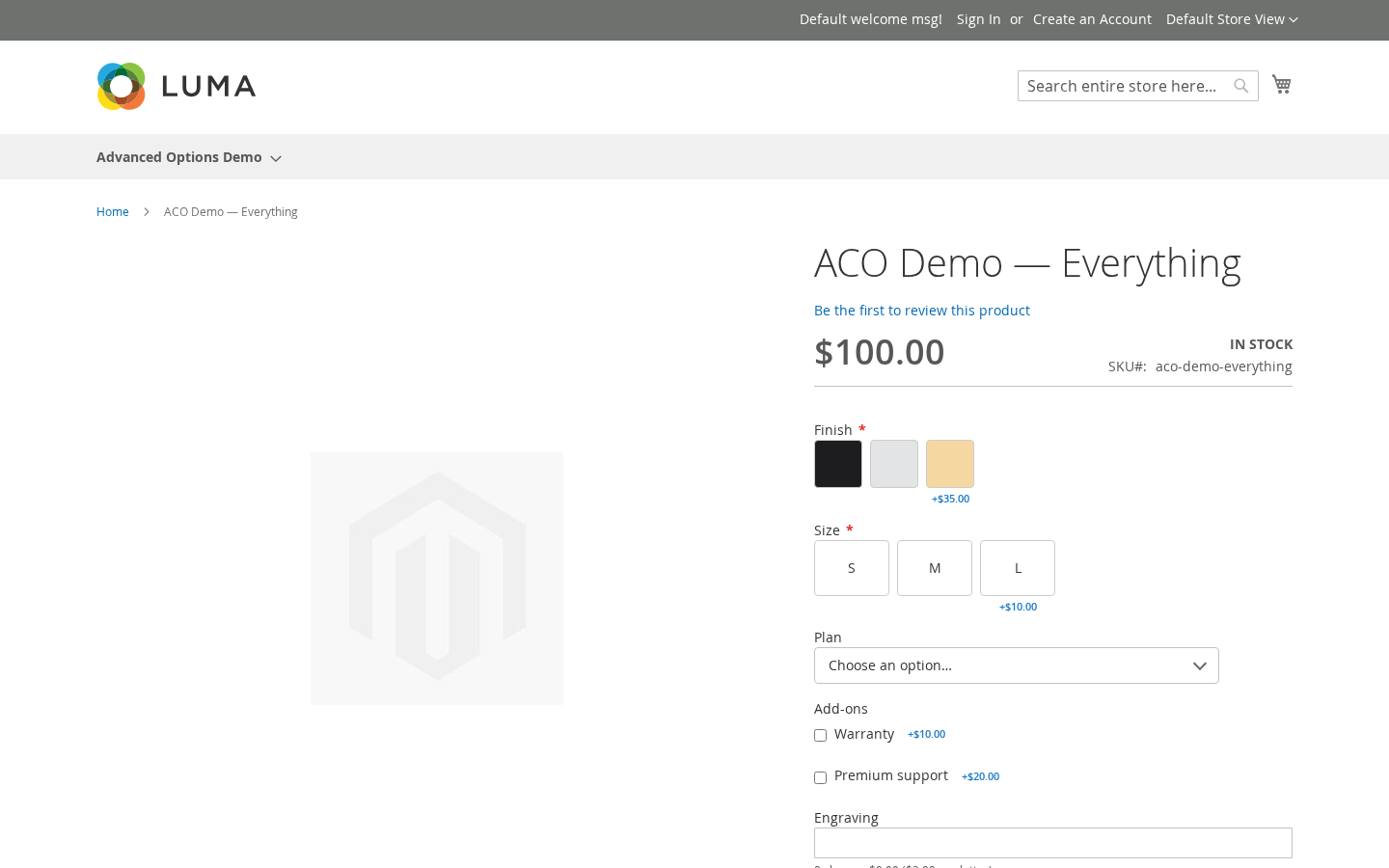
Who it's for
- Stores that sell personalised products. Engraving and gift messages can be priced by their length, and a character limit stops the shopper at the limit instead of failing at checkout.
- Stores with configurations that branch. A brand choice can narrow the model list to that brand's models, and a question that doesn't apply stays hidden — including required ones, which never block the cart while hidden.
- Stores whose option choices are real stock. Each value can hold its own quantity, or be backed by a real product whose stock and SKU travel onto the order.
- Luma, Hyvä and headless storefronts. On Luma the options sit beside configurable, bundle and downloadable selectors; a dedicated Hyvä module renders every surface natively, including Hyvä CSP storefronts; and the option data is published on Magento's own GraphQL product query.
Why it matters
- Fewer abandoned configurations. Swatches, buttons and grid layouts replace long native lists, so a shopper sees the choice instead of reading it.
- Fewer wrong orders. Dependent options hide what doesn't apply, so nobody picks an engraving font for an unengraved product.
- Sell what you actually have. A sold-out value is shown disabled with your message and refused at add-to-cart, instead of becoming a refund.
- Charge for the work you do. Setup fees are billed once per cart line whatever the quantity, and appear as their own taxed Options Fee row on the cart, checkout, invoices, credit memos and PDFs.
- Set it up once. Option templates apply one option set to many products, and a live link carries later edits to all of them.
See it in action
-
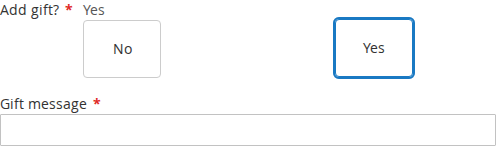
A question that appears only when it applies. You make a Gift message field depend on Add gift? being Yes → it stays hidden until the shopper answers Yes, then appears and is required.
-
A one-off charge kept out of the line price. You charge handling of $7 once per cart line on a $120 plan → the cart shows
Subtotal $120.00,Options Fee $7.00,Order Total $127.00.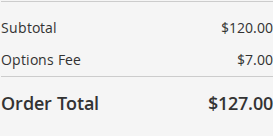
-
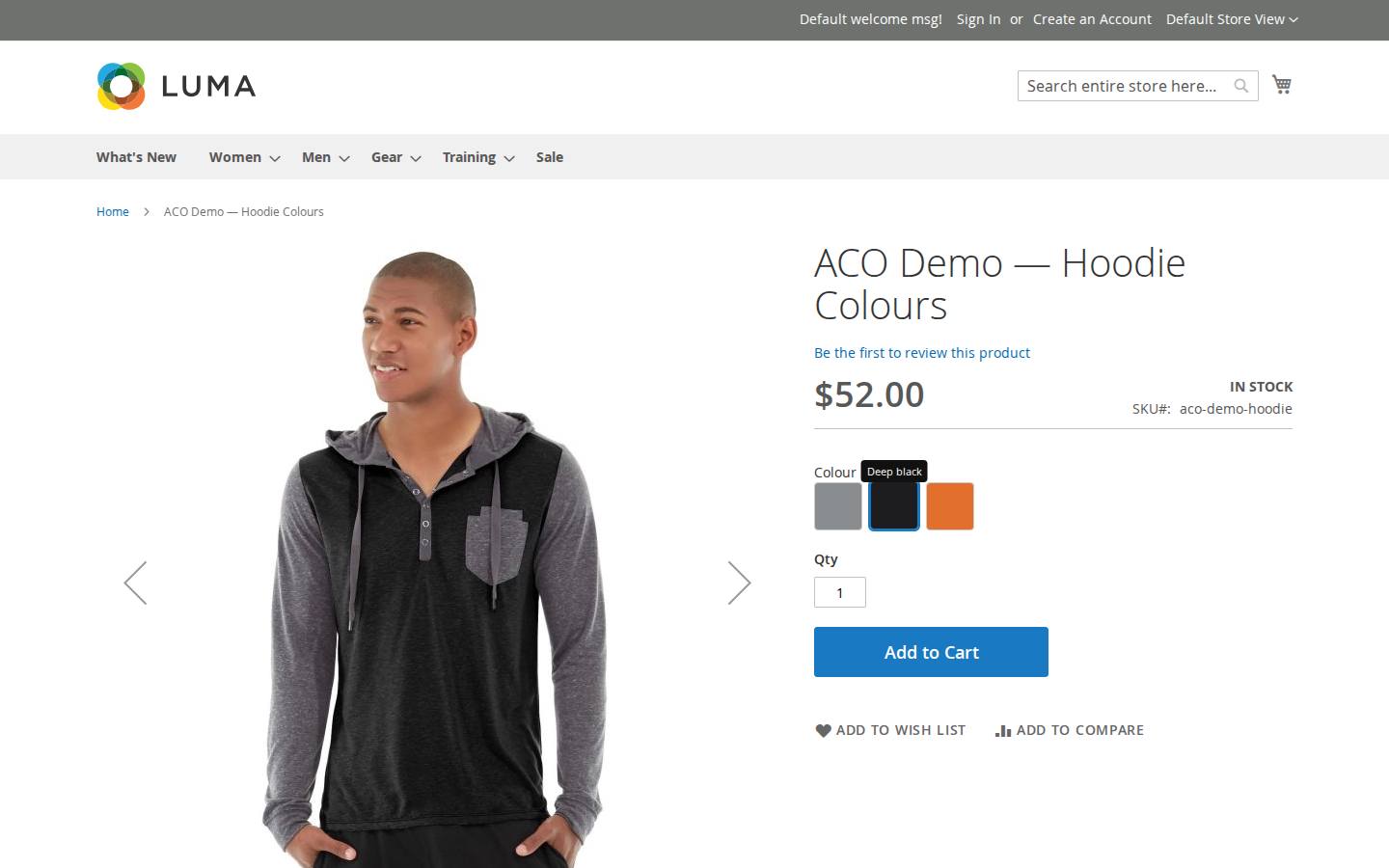
The product photo follows the choice. You attach a photo of the black hoodie to the Black value as Replace main image → the shopper picks Black and the gallery shows the black hoodie.
What it does
| Feature | Benefit |
|---|---|
| Options and swatches | Colour, image and text swatches, buttons, styled dropdowns, multi-checkbox add-ons, grids, and date, time, colour and range inputs — choices look like choices, so shoppers pick faster and ask fewer questions. Each value is edited in one Advanced options dialog |
| Conditional options | Option- and value-level rules mean the form only asks what applies, and a hidden required option never blocks the sale |
| Pricing and fees | Bill the way you quote — per unit, per cart line, absolute, per character, per entered quantity, setup fees — with the same price on the product page and in the cart, in the shopper's display currency, and on GraphQL, REST and admin orders alike. Per-value cost and weight follow the choice onto the order item |
| Option stock | A sold-out value says so and is refused at add-to-cart and at checkout; stock comes back when an order is cancelled, or refunded with Return to Stock |
| Linked products | A value can be a real product: it joins the order at $0 under its parent and draws down its own stock |
| Order SKUs | Configured products reach the order with SKUs your warehouse can pick against |
| Value images | Choosing a value swaps the product photo and shows the value's description |
| Option templates | One option set, many products, still editable in one place |
Competing solutions
The right-hand column describes common practice across the Magento extension market, not any particular vendor.
| Qoliber | Typical marketplace extension | |
|---|---|---|
| Packagist installation | Installed and updated with Composer from our private Packagist (qoliber.repo.packagist.com) | Varies by vendor |
| Slack access to the development team | A shared Slack channel with the developers who build and maintain the module | Usually ticket-based |
| Unit tests | 1,231 PHPUnit unit tests (320 classes) in the repository | Not typically published |
| Integration tests | 345 Magento integration tests (108 classes), run before every release | Not typically published |
| E2E Playwright tests | 181 Playwright end-to-end tests (77 spec files) on Luma and Hyvä, run before every release | Not typically published |
| Documentation | Full docs portal: install, configuration, usage, troubleshooting, developer guide and API reference | Varies by vendor |
| Hyvä support | qoliber/advanced-options-hyva: every renderer, the cart price breakdown and the Options Fee row, on standard and CSP storefronts | Varies by vendor |
| PHP / Magento range | PHP 8.1 – 8.5, Magento Open Source and Mage-OS with magento/framework >= 103.0.0 | Varies by vendor |
Built for Magento, not bolted onto it
- Hyvä-native.
qoliber/advanced-options-hyvaships Alpine and Tailwind templates for every renderer, the cart price breakdown and the Options Fee row, and its components run on Hyvä's CSP build of Alpine, so CSP storefronts work out of the box. - API-first. Every option, value, stock state and dependency rule is readable through Magento's own GraphQL
productsquery — no new endpoint to learn. - Nothing leaves your store. Pricing, stock checks and rule evaluation run inside Magento; the suite calls no third-party service.
Good to know
- Value images on Luma swap only to images already in the product gallery. "Replace main image" finds its image in the product's own gallery; "Add to gallery" does not add, and "Tooltip only" is not rendered yet.
- Content Staging support is not part of the 1.x suite.
qoliber/advanced-options-inventory-stagingis an Adobe Commerce bridge at a0.1.0pre-release.
Supported versions
PHP 8.1 – 8.5. Magento Open Source / Mage-OS with magento/framework >= 103.0.0 and magento/module-catalog >= 104.0.0.