3 min readSep 27, 2026by jakub
Data Layer
Your conversion numbers stop depending on the shopper's browser. Qoliber Data Layer gives Google Tag Manager a complete GA4 ecommerce data layer that you shape in the admin, and sends the purchase from your server as well, so an ad-blocker, a closed tab or a failed payment redirect no longer costs you the conversion.
Latest version: 1.1.0 — changelog
Who it's for
- Stores that run their tags through Google Tag Manager and report in GA4: every GA4 recommended ecommerce event arrives with the parameter names GA4 expects.
- Merchants buying ads on Google, Meta or TikTok who need conversions to reach the ad platform even when the browser pixel is blocked — the module ships destinations for the GA4 Measurement Protocol, the Meta Conversions API and the TikTok Events API, plus GTM Server-Side.
- Stores selling into the EU and UK, where tracking has to wait for consent: Google Consent Mode v2 defaults are set before GTM loads, and the server side respects the consent the shopper gave at the time of the event.
- Hyvä and Luma storefronts alike — Hyvä is covered by the
qoliber/data-layer-hyvacompanion.
Why it matters
- Conversions you were losing come back.
purchaseis sent from the server the moment the order is placed, so a shopper who pays and closes the tab — or whose payment provider never redirects back — is still counted. - Tracking changes without a deployment. Each event is a JSON template you edit, validate and preview in the admin, per store view.
- Numbers that agree across platforms. GA4, Meta and TikTok receive the same event, and a shared event ID lets Meta and TikTok merge the browser and server copies into one conversion.
- Consent risk kept low by default. Consent Mode defaults ship as
denied, and nothing is stored for campaign attribution until the shopper
grants
ad_storage. - Ad spend credited to the click that earned it. The first ad click and UTM campaign of a visit are stored against the order, and a later visit through another campaign does not take the credit.
See it in action
- A category page → one
view_item_listpush listing every product on the page, with its position and the list name — and clicking a product pushesselect_itemfor exactly that product, on category pages and search results. - A shopper changes a cart quantity from 1 to 3 → one
add_to_cartwith quantity2, the difference — not a secondadd_to_cartfor all three. - A grouped product with two of its items added (
24-WG085 × 2 and 24-WG087 × 3) → twoadd_to_cartevents, each with its own SKU and quantity. - A shopper lands from an ad at
?gclid=Cj0KCQtest123&utm_source=google&utm_medium=cpc&utm_campaign=brand→gclid Cj0KCQtest123, utm_source google, utm_medium cpc, utm_campaign brandare stored for the order, and the rest of the landing URL's query string is not. - You map
store_phone=general/store_information/phoneunder Custom Variables → every template can print your store phone as{{config.store_phone}}.
Features
| Feature | Benefit |
|---|---|
| 14 GA4 recommended events, installed ready to use | Tag Manager gets view_item through purchase and refund without theme work |
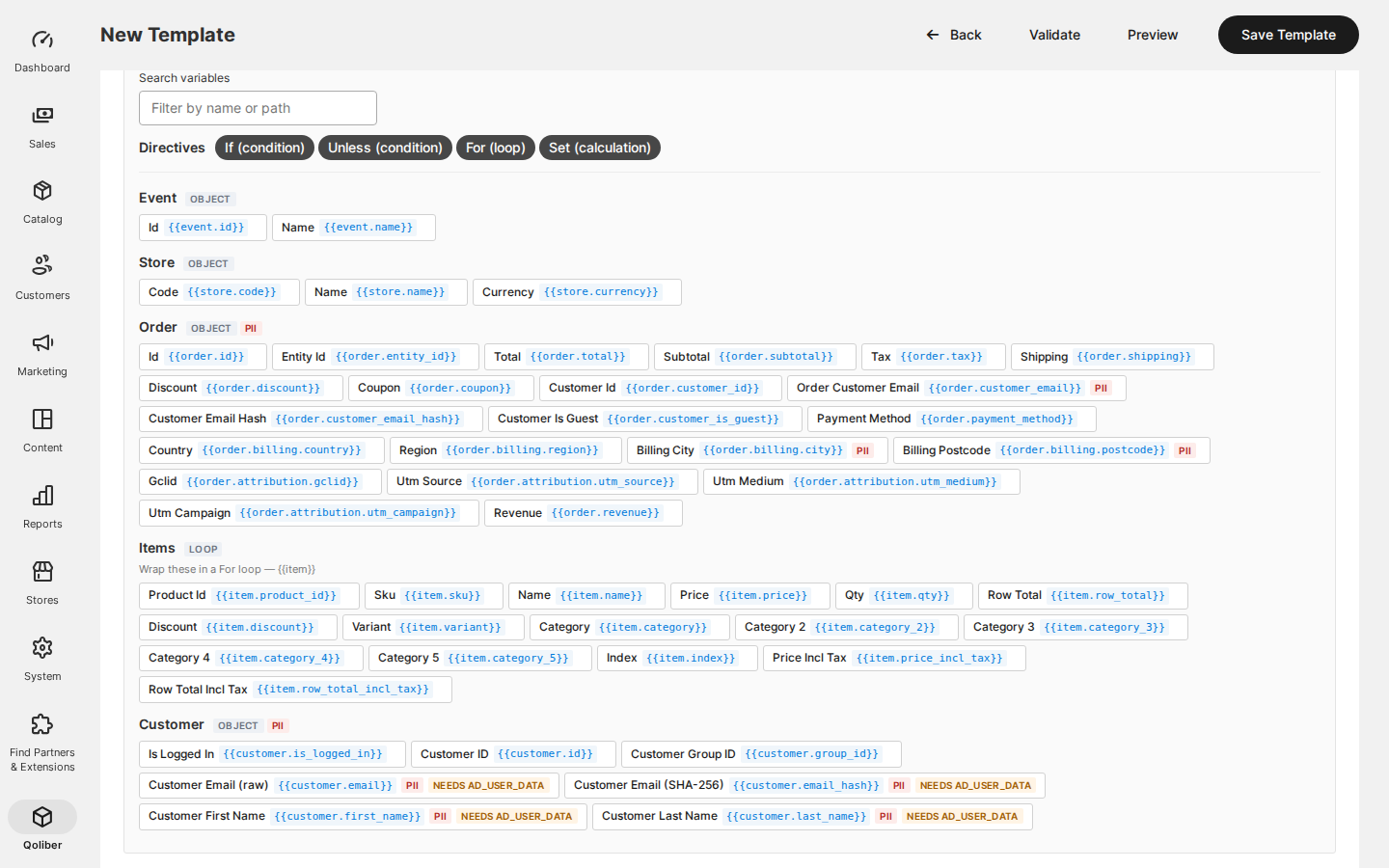
| Data Layer Templates (visual editor) | Change what an event carries, validate it and preview it with sample data before saving — no deployment |
| Server-Side Transmission to GA4, Meta and TikTok | Conversions reach the ad platforms even when the browser pixel is blocked |
| Retries for failed deliveries | A temporary outage at Meta or Google does not lose the conversion |
| Consent (Google Consent Mode v2) | Consent defaults set before GTM loads, and an optional gate that holds events until consent |
| First-touch attribution | Click IDs and UTM campaigns are stored against the order for reporting and server-side events |
| Item Attributes and Custom Variables | Brand, category hierarchy and your own product attributes and store settings in every item |
| Data Layer Dispatch Log | See every server-side delivery, its HTTP status and the reason for a failure |
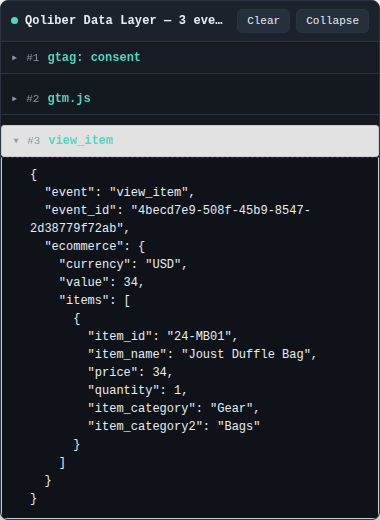
| Storefront debug panel | Check exactly what reaches window.dataLayer, in your own browser only |
| REST API for templates | Manage templates from deployment scripts and integrations |
- Hyvä-native: the
qoliber/data-layer-hyvacompanion delivers the same events on Hyvä without RequireJS or inline JavaScript, and works on stores that enforce a strict Content Security Policy. - API-first: templates can be listed, created, updated and deleted over the REST API.
- No SaaS in between: events are rendered and sent from your own store — there is no third-party tracking service or subscription in the path.
Good to know
- Page views (
view_item,view_item_list, …) are browser-only: product and category pages come from the full-page cache and never reach PHP, so only transactional events can be sent server-side. - Headless storefronts (REST or GraphQL checkouts) get the server-side
purchase, but no browserdataLayerpushes — there is no browser to push to. - On Hyvä, the shipping and payment steps are covered on the Luma-fallback
checkout. Hyvä Checkout (the Magewire checkout) is not intercepted, so it
sends no
add_shipping_infooradd_payment_info;purchaseis unaffected. - GA4's Measurement Protocol cannot merge a browser and a server
purchase, so decide which side reports purchases to GA4 — the configuration page shows the options.
Supported versions
| PHP | 8.1 – 8.5 |
| Magento / Mage-OS | magento/framework ^103.0.7 (Magento Open Source 2.4.6+, Mage-OS equivalents) |
| Hyvä (optional) | hyva-themes/magento2-theme-module ^1.4, with qoliber/data-layer-hyva |