3 min readSep 26, 2026by jakub
Social Login
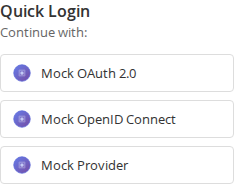
Shoppers sign in or create an account with a provider they already use — Google, Apple, Facebook, Microsoft and 14 more — instead of inventing yet another password, and a guest who signs in at checkout goes straight back to their order with the same cart.
Latest version: 1.3.0 — changelog
Who it's for
- Stores losing sign-ups at the registration form: one click on a provider replaces the whole form, and the account is created from the provider's verified profile.
- Stores with a large guest checkout share: the buttons appear above the checkout for guests, and signing in keeps their cart.
- Stores on Hyvä as well as Luma: a dedicated Hyvä module ships Tailwind templates that build on Hyvä 1.3 (Tailwind 3) and Hyvä 1.4 / 1.5 (Tailwind 4).
- Multi-website installations: a social identity is linked per website, so signing in on one website never opens a customer account on another.
Why it matters
- Fewer abandoned sign-ups — creating an account takes one click at the provider instead of a form.
- Fewer lost checkouts — a guest who signs in at checkout returns to checkout with their cart, whatever your post-login redirect is set to.
- Less support load — customers who forgot which password they used sign in with the provider instead, and existing customers can link a provider to their account.
- Data you choose to keep — profile photo, birthday and gender are only stored when you switch them on; everything else the provider sends is discarded.
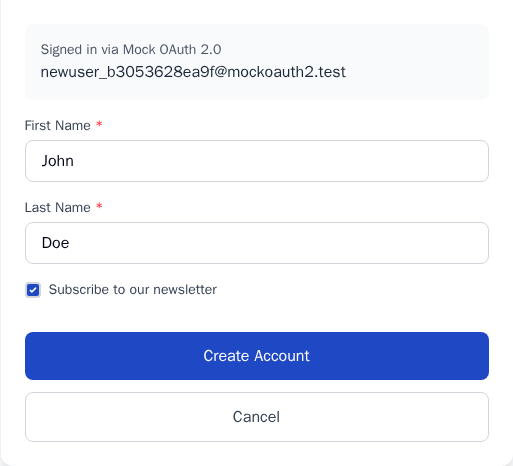
- Consent kept — ticking "Subscribe to our newsletter" while confirming a social sign-up subscribes the customer.
See it in action
- You set: Google enabled, with the client ID and secret from Google Cloud Console, and the Redirect URI shown in the admin registered with Google. You get: a Google button on the login, registration and checkout pages, and — if you leave One Tap on — Google's One Tap prompt on storefront pages, without turning off full page caching.
- You set: Enable on Checkout = Yes. You get: a guest with items in the cart sees the buttons above the checkout, signs up with a provider, and lands back on the checkout with the same cart.
- You set: Auto-Approve New Accounts = No. You get: new customers review their name and email on a confirmation form, with a "Subscribe to our newsletter" box, before the account is created.
- You set: a self-hosted GitLab, with Instance URL
https://gitlab.yourcompany.com. You get: a GitLab button that signs customers in against your own GitLab instead of gitlab.com.
| Feature | Benefit |
|---|---|
| 18 sign-in providers (Amazon, Apple, Bitbucket, Discord, Facebook, GitHub, GitLab, Google, LINE, LinkedIn, Microsoft, PayPal, Pinterest, Reddit, Slack, TikTok, Twitch, X) | Offer the accounts your customers actually have — enable only the ones that fit your audience. |
| Checkout sign-in | Guests sign in without leaving the order they are placing. |
| Google One Tap | Returning Google users sign in from any page with one tap. |
| Account linking and the "Connected social accounts" page | Existing customers add or remove providers themselves. |
| Confirmation step (optional) | Customers review their details and newsletter consent before the account is created. |
| Redirect after login (dashboard, home, previous page or a custom URL) | Send customers where it suits your store. |
| Redirect URI and Test Connection per website or store view | Configure each scope correctly the first time. |
| Nightly token clean-up | Expired provider tokens are cleared automatically; the customer's link stays. |
- Hyvä-native —
qoliber/social-login-hyva-suiteadds Hyvä templates built with Tailwind, compatible with Hyvä 1.3, 1.4 and 1.5. - No SaaS in between — the store talks to each provider directly with the credentials you register; no third-party login service sees your customers.
Good to know
- You create an app (client ID and secret) in each provider's developer console, and register the Redirect URI the admin shows you — the module cannot do that part for you.
- Headless and PWA storefronts are not supported: the suite has no GraphQL or REST API, so a headless frontend implements the sign-in flow itself.
- Pinterest customers are identified by their Pinterest account ID. Customers who linked Pinterest before 1.3.0 link it once more.
Supports PHP 8.1–8.5 and Magento Open Source / Adobe Commerce 2.4.
Install Social Login · Configure it · Partnership and licensing