Quote Request
Some orders need a conversation first. Quote Request keeps that conversation in your store: the buyer builds a quote cart, you set a price per line and send a proposal, and when they accept, they check out at exactly the price you agreed. No email thread, no spreadsheet, no order retyped by hand.
Latest version: 1.0.3 — changelog
Who it's for
- B2B stores whose buyers ask for volume or account pricing. The optional B2B module holds a discount above your threshold until a second admin approves it, and assigns each request to a sales rep.
- Stores that do not publish every price. Hide Price replaces the price and Add to Cart with a request for a quote, for the customer groups or the products you choose.
- Stores whose buyers will not open an account to ask a question. Guest quote requests work with an email address and a link sent to it, and the guest can open an account from the quote when they are ready.
- Headless and ERP-connected stores. REST and GraphQL let another system read quote requests and answer them, with the same guarantees the storefront has.
Why it matters
- The agreed price is the price charged. The negotiated price goes through Magento's own totals and checkout into the order, and coupons, cart rules, quantity changes and currency switches cannot move it.
- Negotiation stays in the store. Prices, comments and decisions live on the quote request, not in somebody's inbox, and every step writes a history row.
- No orders at a price you can no longer honour. An accepted quote whose product was disabled, deleted, ran out of stock, expired or was already ordered is refused at checkout instead of becoming an order.
- Buyers answer on their own time. From My Quote Requests they accept, reject with a reason or ask for a revision, and are emailed at every step.
- Big discounts get a second pair of eyes. With the B2B module, a rep cannot send a proposal over the threshold until an approver says yes, and an approval is tied to the version it approved.
See it in action
-
You set the Increment ID Prefix to
Q-→ you get quote requests numberedQ-000000001,Q-000000002and so on, counted per store view. -
You type a negotiated price of
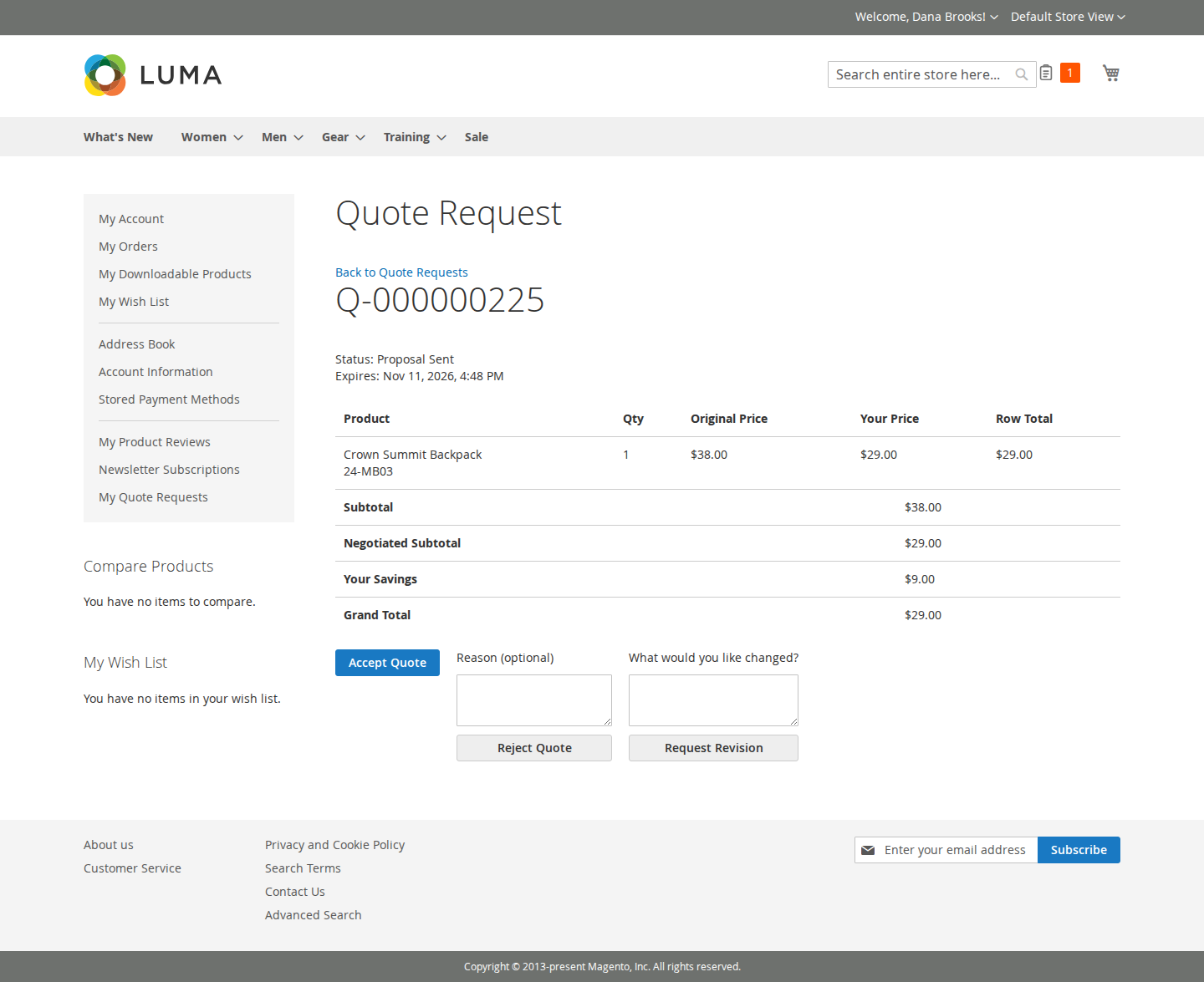
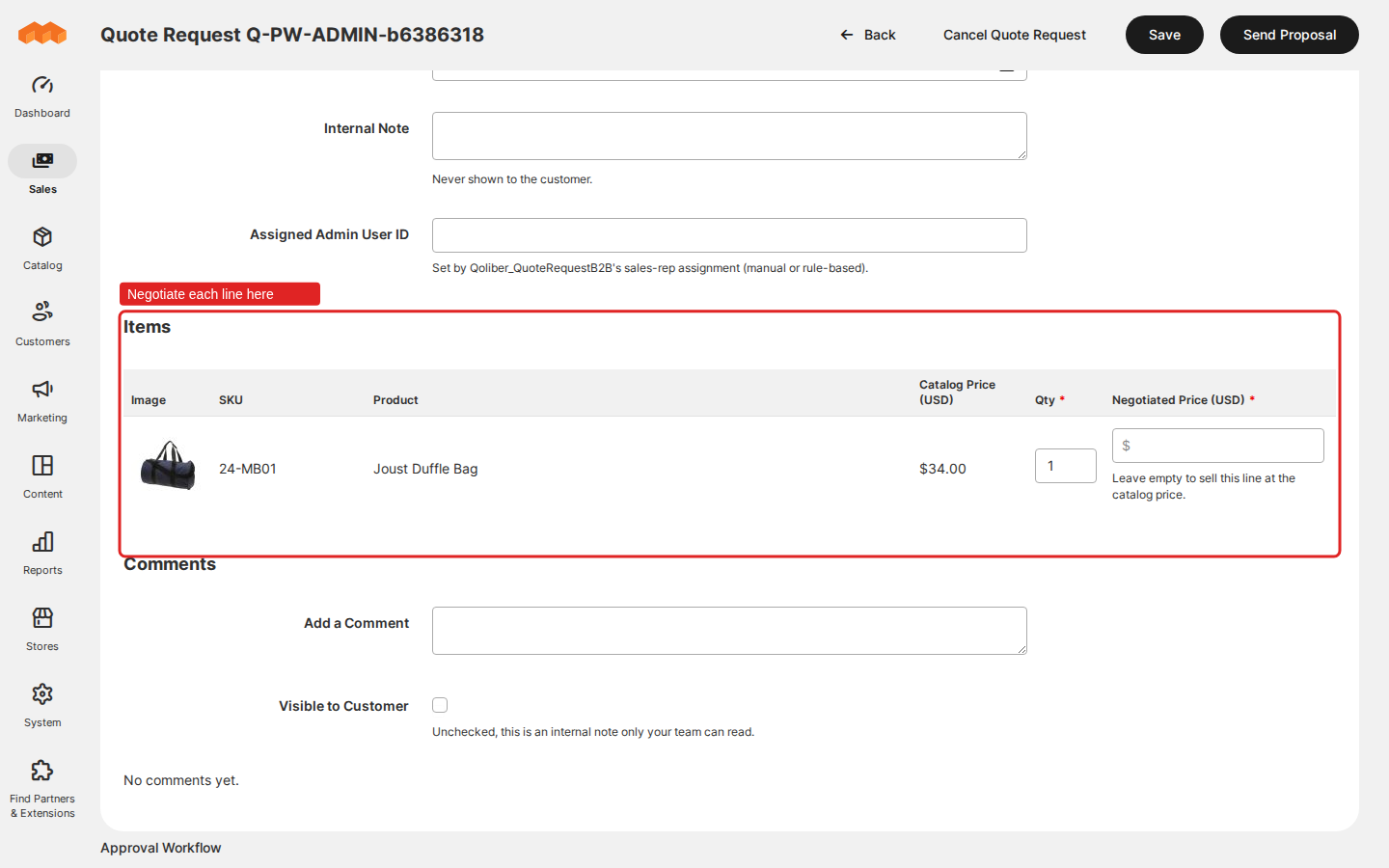
$29.00on a line whose catalog price is$34.00and click Send Proposal → your customer is emailed a link, sees both prices side by side, clicks Accept Quote, then Proceed to Checkout, and is charged$29.00.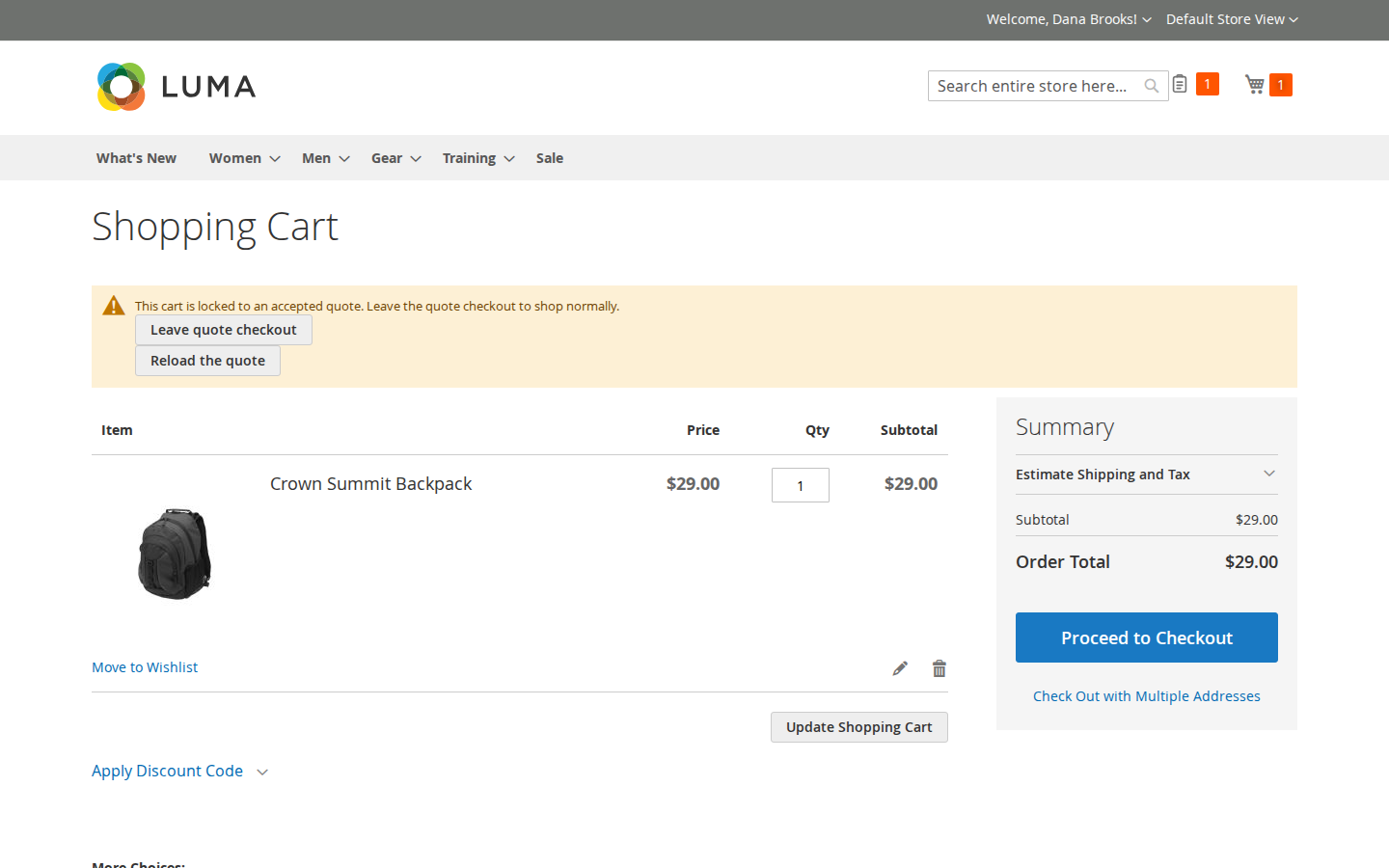
-
You set the B2B Discount Threshold (%) to
10→ that same proposal ($34.00down to$29.00is about 14.7% off) is refused with "use Request Approval instead of Send Proposal"; the rep requests approval, an approver approves and the proposal goes out, or rejects it with a reason and it comes back for rework. -
A visitor with no account adds a product, types an email address and submits → they get a link by email, accept your proposal from it, buy it as a guest, and can open an account from the same page.
What it does
| Feature | Benefit |
|---|---|
| Quote cart and Add to Quote | Buyers collect what they want priced without disturbing the cart they may also be buying from, or turn a full shopping cart into a quote request in one click |
| Negotiate and send a proposal | One grid for every request, a price per line, internal notes the customer never sees, and one button to send |
| Answer a proposal | Buyers accept, reject with a reason or ask for a revision in their account, newest requests first |
| Checkout at the negotiated price | The accepted prices go into a locked cart and through Magento's own checkout; the order marks the quote ordered |
| Lifecycle and general settings | One switch, an expiry in days and your own numbering; every status change on the record |
| Emails and expiry | Nine emails, queued with the change that caused them and sent by cron, so a mail outage never undoes a decision |
| Guest quote requests | Visitors get a quote with an email address, no account needed, and can open one later |
| Hide price | Show a request for a quote instead of a price, for the groups or products you choose |
| B2B approval and sales reps | Large discounts need an approver, and every request has a rep |
| REST and GraphQL | Headless storefronts and ERPs read and answer quote requests; a retried call is answered with what the first call answered |
Competing solutions
The right-hand column describes common practice on the extension market, not any particular vendor.
| Qoliber | Typical marketplace extension | |
|---|---|---|
| Packagist installation | Installed and updated with Composer from our private Packagist (qoliber.repo.packagist.com) | Varies by vendor |
| Slack access to the development team | A shared Slack channel with the developers who build and maintain the module | Usually ticket-based |
| Unit tests | 700 PHPUnit unit tests (241 classes) in the repository | Not typically published |
| Integration tests | 569 Magento integration tests (157 classes), run before every release | Not typically published |
| E2E Playwright tests | 42 Playwright end-to-end tests (25 spec files) on Luma and Hyvä, run before every release | Not typically published |
| Documentation | Full docs portal: install, configuration, usage, API reference | Varies by vendor |
| Hyvä support | Hyvä templates for every storefront screen, written for Hyvä's strict content security policy | Varies by vendor |
| PHP / Magento range | PHP 8.1 to 8.5, Magento Open Source and Mage-OS 2.4.6 and later | Varies by vendor |
Built the way your store is built
-
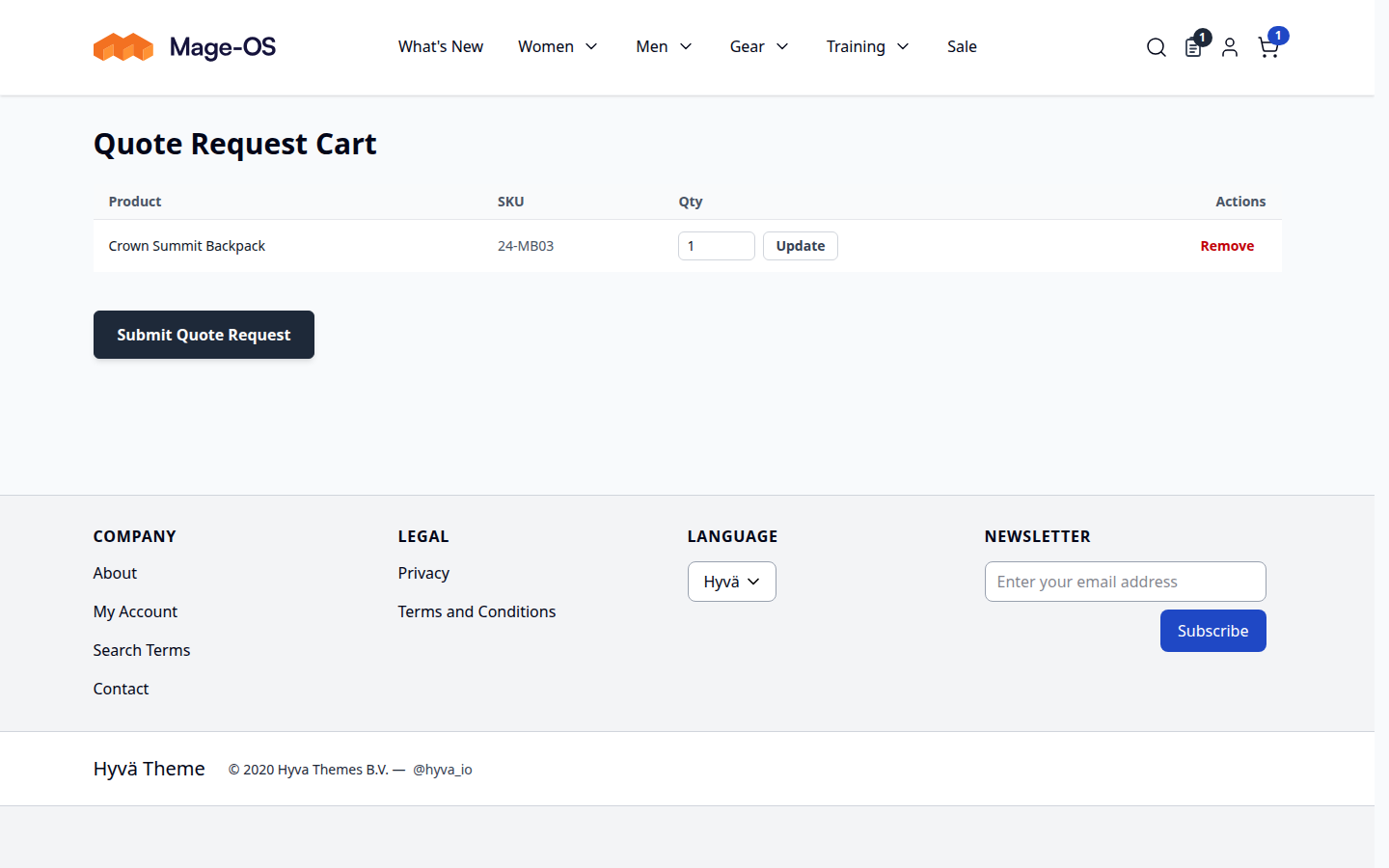
Hyvä-native. Every storefront screen has a Hyvä template, written for Hyvä's strict content security policy, not a Luma page inside a Hyvä theme.
-
API-first. REST endpoints for customers and admins, and GraphQL queries and mutations for customers, every change carrying the version it was read at and an idempotency key.
-
No SaaS. Everything runs inside your Magento. No third-party service sees your prices, your customers or your negotiations.
Good to know
- Quotes do not reserve stock. Nothing is held while you negotiate; stock is checked again when an accepted quote is loaded for checkout.
- Hide Price hides prices on the storefront; it does not make them secret. Catalog prices stay readable through GraphQL, REST and product feeds.
- Dynamically priced bundles cannot be quoted. Simple, configurable, grouped and fixed-price bundle products, and custom options, can.
- Email and expiry run on Magento cron. Without cron, no email is sent and nothing expires.
Supported: PHP 8.1 to 8.5 · Magento Open Source / Mage-OS 2.4.6+ (magento/framework ^103.0,
module-sales ^103.0, module-quote ^101.0, module-catalog ^104.0).
Ready to start? See installation and configuration. For licensing or partnership questions, see partnership.