Catalog Assembler
Your category, search and product pages read catalog data that was assembled ahead of time, instead of rebuilding every product from Magento's attribute tables on each request. Cart, checkout and every write keep using live Magento data, so a snapshot can show an old value for a moment but can never charge or sell one.
Latest version: 2.7.0 — changelog
Who it's for
- Stores whose product and category pages spend their time in EAV. A warm product page reads the product from its snapshot without touching the attribute value tables, and a listing fetches the prices of a whole page in one storage read.
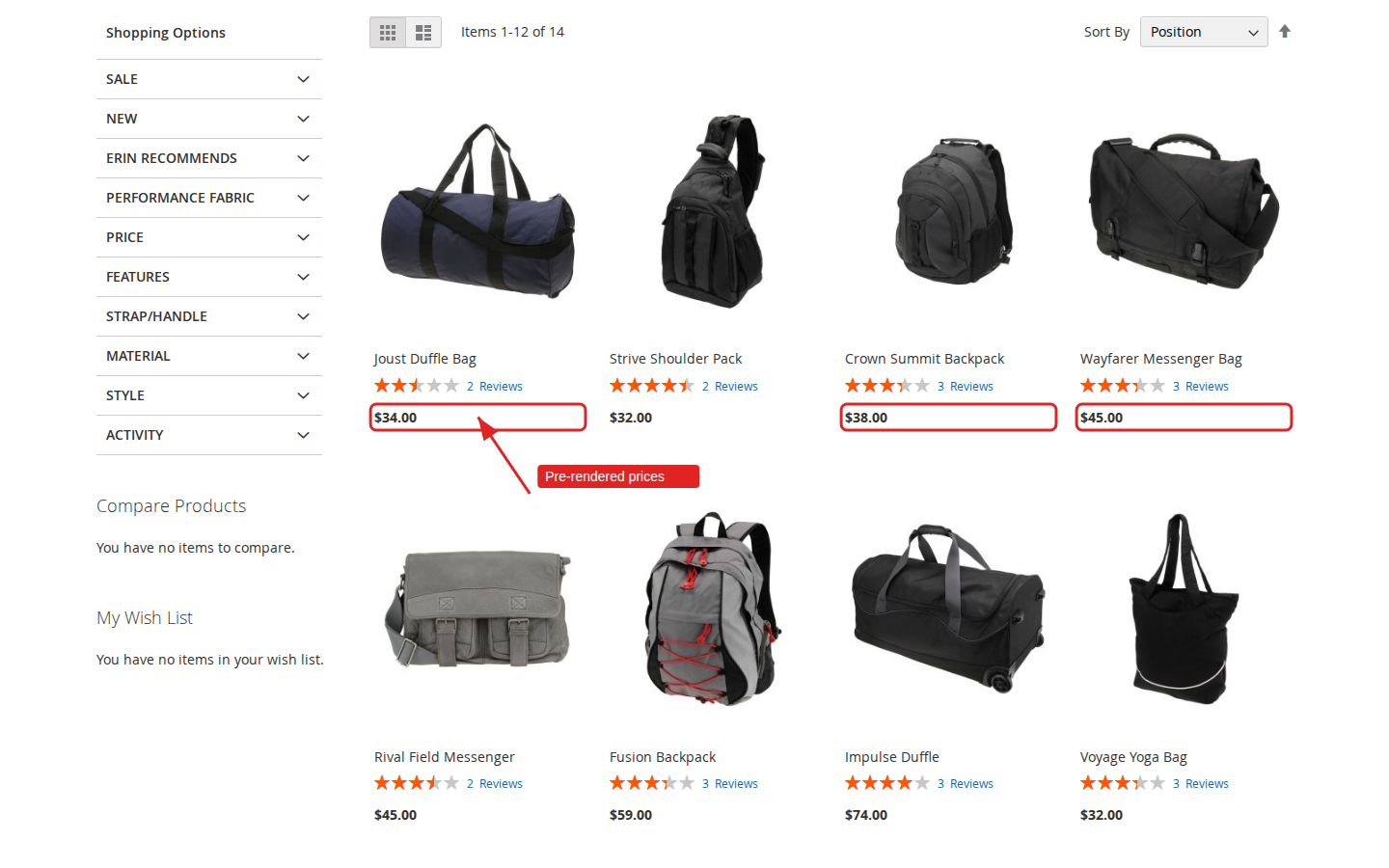
- Luma storefronts. Category and search listings use pre-rendered price fragments out of the box. Hyvä and custom themes keep their native listings and can opt in through a display-only tile API.
- Stores that run more than one web server. Snapshots can live in Redis, with ACL credentials and TLS for managed services such as AWS ElastiCache.
- B2B and customer-group pricing. An optional dimension builds one snapshot per customer group, so logged-in customers are served snapshots priced for their group.
Why it matters
- Less database work per page view. A warm product page skips the attribute value tables entirely, and a listing asks storage for all of its prices at once.
- No stale price at checkout. Snapshots only ever reach display: cart, checkout, REST, GraphQL, the admin, cron and CLI read Magento directly, so a customer is always charged the current price.
- Bulk changes reach the storefront. Mass attribute updates, CSV imports and direct SQL price changes are picked up by database triggers, and the affected pages are purged from the full-page cache.
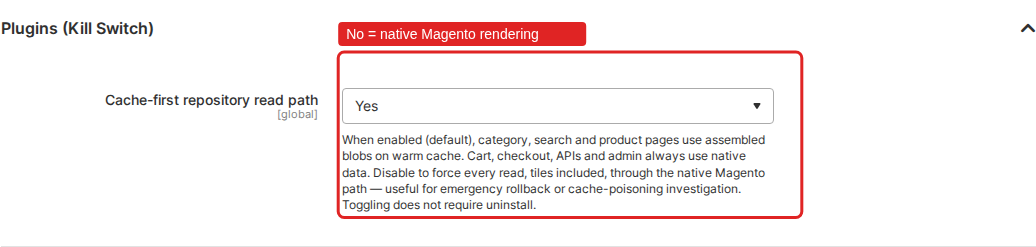
- One switch back to native. Turning off the read path puts every page back on Magento's own rendering, without an uninstall or a redeploy.
See it in action
-
You warm a product → its listing tile carries a pre-rendered price. After
bin/magento catalog-assembler:build:product 24-MB01 --store=1, the Joust Duffle Bag tile in Gear › Bags gets theproduct-item--assembledmarker and its price comes from the snapshot. Magento still renders the item, its image, its Add to Cart form and its reviews.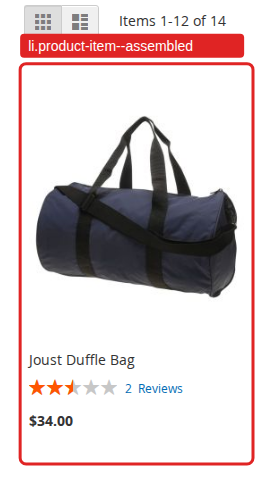
-
You change prices in bulk → the next cart still charges the new price. A mass attribute update or a direct SQL price change drops the old snapshot on the next indexer cron run, which is scheduled every minute, and the cart charges the current price even before that, because the cart never reads snapshots.
-
A product has a scheduled special price, a MAP price or its own page design → it stays native. Those product pages and their listing prices are rendered by Magento, as the second tile in the first screenshot on this page shows.
-
You set "Cache-first repository read path" to No → every page is native again. Saving the setting purges the full-page cache, so cached pages do not keep serving snapshot prices.
What you can do
| Feature | Benefit |
|---|---|
| What shoppers see | Category, search and product pages served from snapshots look exactly like your store does today |
| Warm the catalog | Build snapshots for one product, a category or the whole catalog, and resume a large warm-up where it stopped |
| Keep blobs fresh | Saves, imports and mass updates refresh snapshots on their own, and a nightly rebuild catches everything else |
| Check what is served | See which tiles come from a snapshot, read a stored snapshot and time each part of a build |
| Store blobs in Redis | Share snapshots across web servers, with ACL credentials and TLS for managed Redis |
| Switch back to native rendering | Roll every page back to Magento's rendering in one save, for an incident or an investigation |
| Companion modules | Bundle, configurable, grouped, reviews and swatches data in the snapshot, installed only for the product types you sell |
| Extension API | Add your own data to snapshots with collectors, add dimensions, or plug in another storage backend |
Competing solutions
The right-hand column describes common market practice, not any particular vendor.
| Qoliber | Typical marketplace extension | |
|---|---|---|
| Packagist installation | Installed and updated with Composer from our private Packagist (qoliber.repo.packagist.com) | Varies by vendor |
| Slack access to the development team | A shared Slack channel with the developers who build and maintain the module | Usually ticket-based |
| Unit tests | 331 PHPUnit unit tests (54 classes) in the repository, run in CI on PHP 8.1 to 8.5 | Not typically published |
| Integration tests | 158 Magento integration tests (41 classes), run in CI on Mage-OS and on Magento 2.4.7 and 2.4.9 | Not typically published |
| E2E Playwright tests | 13 Playwright end-to-end tests (4 spec files) on Luma, including a release check on a disposable store | Not typically published |
| Documentation | Full docs portal: install, configuration, usage, module pages, troubleshooting and developer guide | Varies by vendor |
| PHP / Magento range | PHP 8.1 to 8.5; Magento Open Source 2.4.7 to 2.4.9 and Mage-OS 1.0.3 and later | Varies by vendor |
- Runs inside your store. Snapshots are built by your own Magento and stored on its file system or in your own Redis. No third-party service is involved.
Good to know
- Display only. Snapshots serve category, search and product pages for GET and HEAD requests. Cart, checkout, REST, GraphQL, the admin, cron and CLI always use native Magento data.
- Simple and virtual products. Product pages and listing prices come from snapshots for simple and virtual products without custom options. Bundles, configurables, grouped products, products with custom options, a MAP price, their own page design or a scheduled special price are rendered by Magento.
- Guests by default. Without the customer-group dimension, logged-in customers get native pages. A switched currency, or a customer priced by their own tax address, also gets native pages.
- Luma listings only. Hyvä and custom themes keep their native listings unless you integrate the tile API. Adobe Commerce Catalog Staging is not supported.
- Warm before you measure. A new install, an upgrade to 2.7.0 and a full reindex all leave the catalog cold: pages
are native until
bin/magento catalog-assembler:build:allhas run. Benchmark native, cold, warm and full-page-cache hits separately on your own catalog.
Supports Magento Open Source 2.4.7 to 2.4.9 and Mage-OS 1.0.3 and later, on PHP 8.1 to 8.5
(~8.1.0 || ~8.2.0 || ~8.3.0 || ~8.4.0 || ~8.5.0).
Get started: Install · Configure · Partnership and licensing