Product Labels
Product Labels puts sale badges, new-arrival tags, and custom promotions directly on your product images — matched automatically by the same condition rules that drive a catalog price rule — so shoppers notice what matters without you touching a single template file.
Latest version: 1.5.0 — changelog
Who it's for
- Stores that run price promotions. Label text can quote a product's special price, the percentage and amount saved, and a live countdown to the end of the sale — straight from the catalog's own prices.
- Stores with fast-moving or limited stock. Stock and quantity triggers show messages such as "Out of Stock" or "Only 5 left" only on the products they apply to.
- Hyvä and Luma storefronts. A companion module renders the same labels, countdown included, on Hyvä themes.
- Teams that manage merchandising from a PIM or ERP. Labels can be created, updated, searched and deleted over REST, with a separate admin permission for each operation.
Why it matters
- Highlight sales, new arrivals, and promotions on product images across the product page, category listings, search results, and widgets — without editing a single template.
- Labels are targeted by the same condition builder used for catalog price rules (SKU, category, attribute, or any combination), so the right products get labeled automatically as your catalog changes.
- Priority and "stop further label processing" give you control over which label wins when several rules match the same product, so listings never look cluttered.
- Stock and quantity triggers hide or show labels automatically as inventory changes, so a "sale" badge never lingers on a sold-out product.
- Scheduled start and end dates begin and end promotions on their own, and the page cache is purged automatically so shoppers always see the current label — no reindex required.
See it in action
A sale badge that does its own math. You set a Dynamic label with the text Was {SPECIAL_PRICE}, save {SAVE_PERCENT}% ({SAVE_AMOUNT}) on a product that costs $100.00 with a $75.00 special price. Shoppers see Was $75.00, save 25% ($25.00) — and when the special price changes, the label changes with it.
A countdown to the end of the sale. You set the text Ends in {SPDL}d {SPHL}h on products whose special price has an end date. Shoppers see something like Ends in 2d 5h, counting down in the browser until it reaches Ends in 0d 0h — the same numbers for every visitor, whatever their timezone.
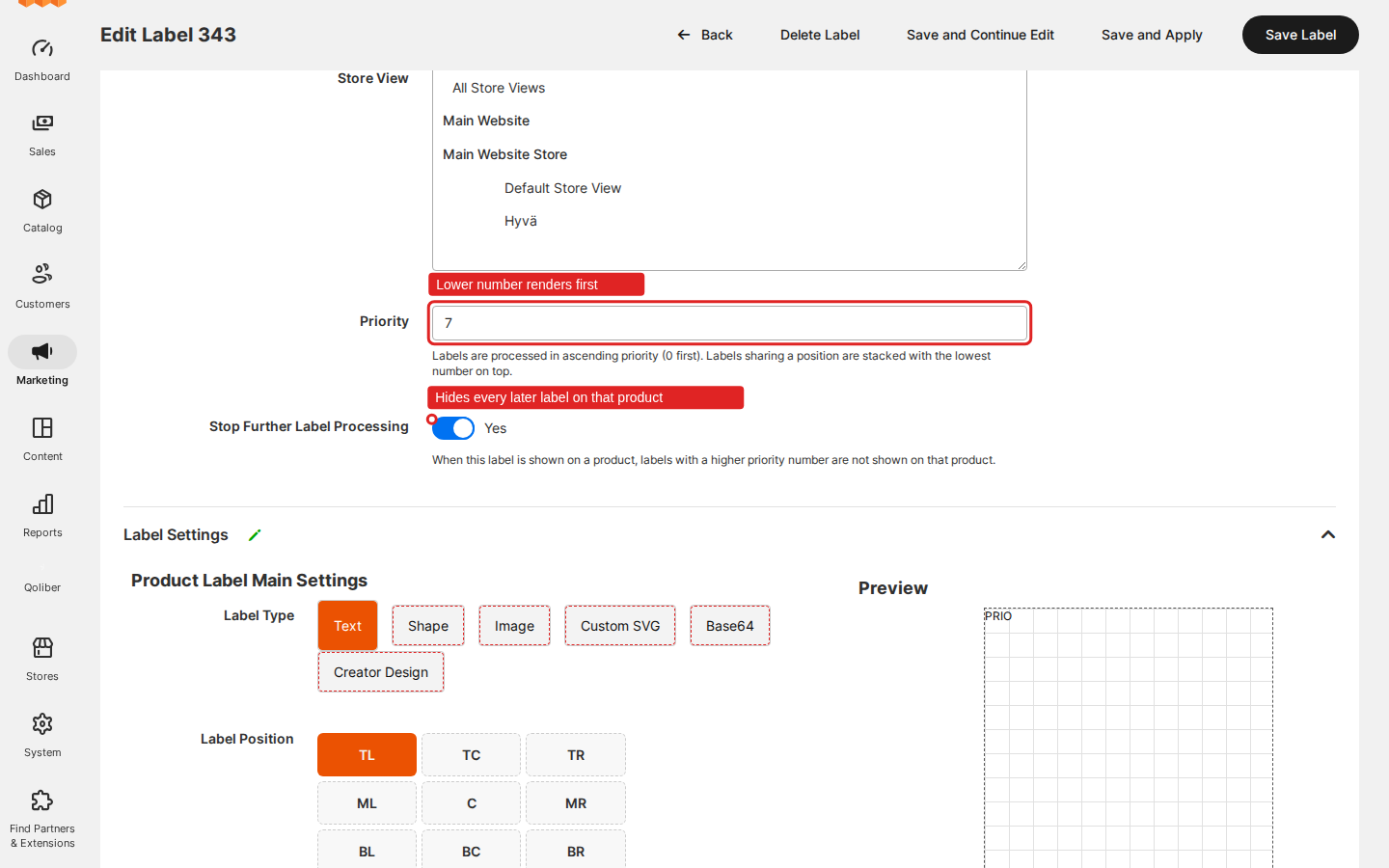
One label wins. You give a "SALE" label priority 10 with Stop Further Label Processing switched on, and a "NEW" label priority 20. A product matched by both shows only SALE. Switch stop processing off and both appear, SALE painted on top.
Feature → benefit
| Feature | Benefit |
|---|---|
| Create a text label | Put a badge on the right products from one admin form, and publish it with Save and Apply without waiting for an indexer run. |
| Find, edit and delete labels | Keep every promotion in one grid, change it in place, and remove it knowing the storefront follows at once. |
| Choose a visual type | Match any brand style — text, a built-in shape, your own image, SVG artwork or a Base64 image — without a developer building a template. |
| Position, rotate and style label text | Place the badge on any corner or edge of the image, tilt it, and pick its color and size, with a live preview as you work. |
| Match products with the condition tree | Target labels by SKU, category, attribute, or any combination — the same condition tree as a catalog price rule, no custom code. |
| Schedule a label with Active From and Active to | Start and end promotions on schedule — a minute-by-minute cron job clears cached pages so shoppers never see a stale label. |
| Control display with stock and quantity triggers | Show or hide labels automatically based on stock status or available quantity. |
| Order labels with priority and stop further processing | Decide exactly which label displays first, and whether it hides lower-priority labels on the same product. |
| Variables and worked examples | Labels stay accurate on their own — {PRICE}, {SAVE_PERCENT}, {SKU}, {ATTR:code} and the countdown resolve from product data, so no manual edits when a price or attribute changes. |
| Design a label in the Label Designer | Design custom label artwork directly in the admin with the optional Creator add-on, no external image editor needed. |
| What shows on the storefront | The same label appears wherever the product image does — product page, listings, widgets, related items — on Luma and, with the optional add-on, on Hyvä. |
| REST API | Create, read, update, delete, and search labels from your PIM, ERP, or any external system. |
Competing solutions
The right-hand column describes common practice on the Magento marketplace, not any particular vendor.
| Qoliber | Typical marketplace extension | |
|---|---|---|
| GitLab access | Full access to the module's GitLab repository — source, history, issues and merge requests | Varies by vendor |
| Packagist installation | Installed and updated with Composer from our private Packagist (qoliber.repo.packagist.com) | Varies by vendor |
| Slack access to the development team | A shared Slack channel with the developers who build and maintain the module | Usually ticket-based |
| Unit tests | 970 PHPUnit unit tests (240 classes) in the repository | Not typically published |
| Integration tests | 184 Magento integration tests (33 classes), run before every release | Not typically published |
| E2E Playwright tests | 113 Playwright end-to-end tests on Luma and Hyvä (52 spec files), run before every release | Not typically published |
| Documentation | Full docs portal: install, configuration, usage, API reference | Varies by vendor |
| Hyvä support | A dedicated Hyvä companion module, tested on a Hyvä storefront before every release | Varies by vendor |
| PHP / Magento range | PHP 8.1 through 8.5 on magento/framework ^103.0 (Magento Open Source, Adobe Commerce and Mage-OS) | Varies by vendor |
What makes it different
- Hyvä-native — a dedicated companion module renders labels with Hyvä-standard markup and a CSP-safe Alpine.js countdown, not a bolted-on compatibility shim.
- API-first — every label operation available in the admin (create, read, update, delete, search) is also available over five REST routes, ready for headless and integration use cases.
- No SaaS — matching, rendering, scheduling, and cache invalidation all run inside your own Magento instance. No label data ever leaves your store.
Good to know
- Quantity triggers skip configurable, bundle and grouped products. Those product types have no stock quantity of their own, so a label with a quantity trigger never shows on them. Stock-status triggers still work.
- Grouped products never show a saving.
{SAVE_PERCENT}and{SAVE_AMOUNT}resolve to0on a grouped product, because it has no regular price of its own to compare against. - Matching changes go through the label indexer. Edits to a label's conditions, status or store views appear after its reindex — at once in "Update on Save" mode or with Save and Apply, otherwise on the next indexer cron run. Text, dates, triggers and priority take effect without one.
- Quantities come from the default stock.
{STOCK}and quantity triggers read the quantity of Magento's default stock. The separate MSI add-on is not ready for stores whose websites sell from a custom Multi-Source Inventory stock — keep it disabled.
Compatibility: PHP 8.1–8.5, on Magento Open Source or Adobe Commerce running magento/framework ^103.0 and the standard catalog, catalog-rule, catalog-inventory, catalog-widget, cron, page-cache, rule, store, ui, and webapi modules.